Jekyll2026-10-03T09:30:42+00:00https://msg.samsonov.io/feed.xmlCommit MessagesReflections on code, craft, and the future of softwareAndrey SamsonovRails’ Default Authentication Has a Database Restore Problem2026-09-30T00:00:00+00:002026-09-30T00:00:00+00:00https://msg.samsonov.io/when-a-database-restore-signs-you-in-as-someone-elseFor a small Rails app, restoring the development database from a production backup is often practical. It is quick, it gives you real data, and Rails’ default SQLite setup makes the restore easy.
I set this up for a new Rails 8.1 app, and it became a normal part of development. Some time later, after one restore, I opened the app and found myself signed in to a user’s account I had never logged into.
At first I thought this was only a strange side effect of my development setup. The same sequence can happen during production recovery, with no development environment involved.
The cause turned out to be in the authentication code generated by Rails 8.1. It stores the session’s integer primary key in a signed cookie and looks the session up by that number:
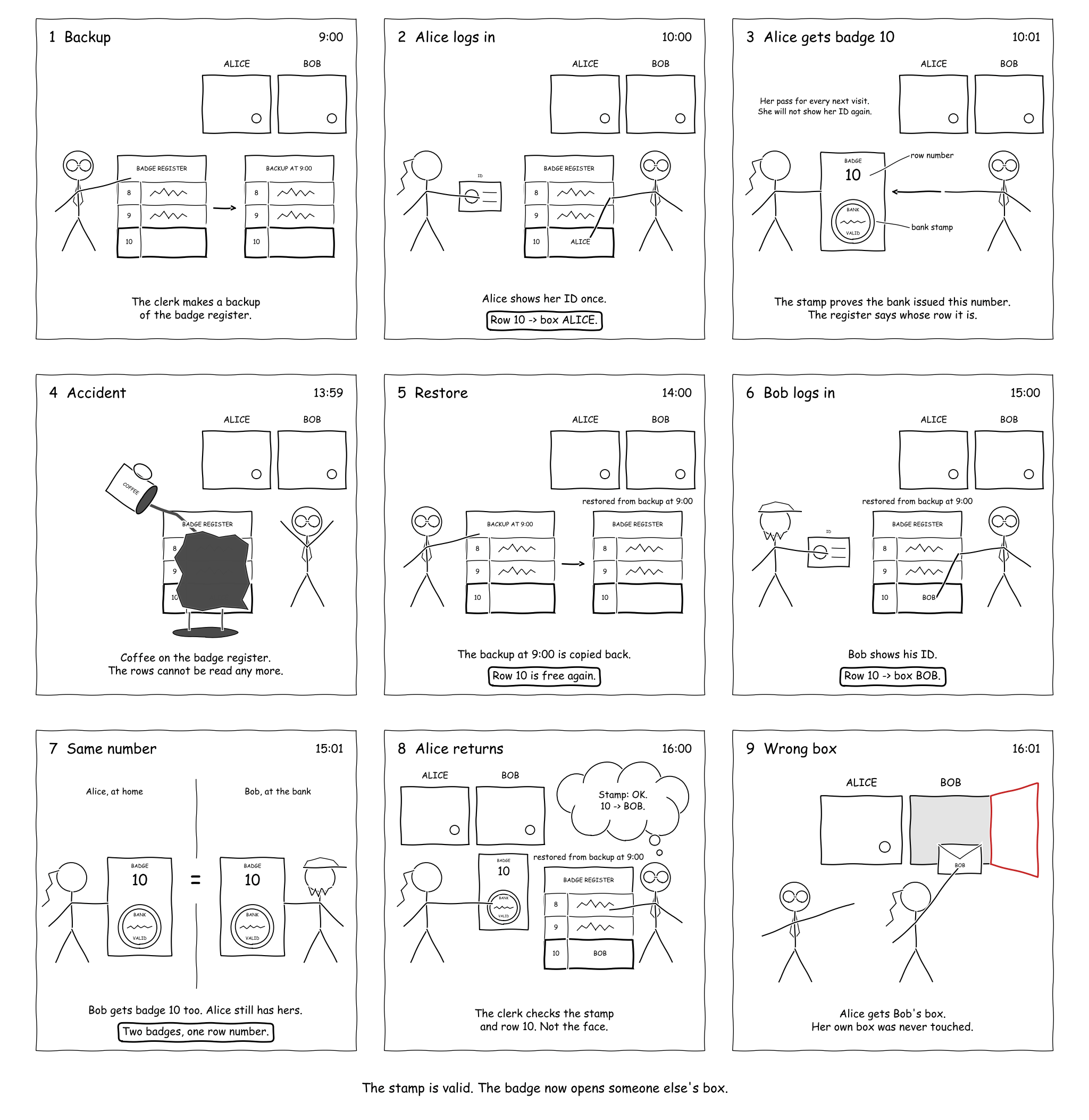
We back up the database when the session id counter is at, for example, 1000.
Alice signs in. Rails inserts a row into the sessions table with the primary key sessions.id = 1001. Her signed cookie contains the number 1001.
Production is restored from the backup. Alice’s row disappears, and the session id counter goes back to 1000. Her cookie and the application’s signing key stay the same.
Bob signs in. Rails inserts a new row with sessions.id = 1001, but this row belongs to Bob.
Alice opens the app again. Her cookie still has a valid signature, so Rails looks up the current row with sessions.id = 1001 and signs her in as Bob.
There could be many Alices, each holding many cookies. If the app allows enough logins, attackers could collect a million valid session cookies between them before a restore, then replay them afterward as those ids are issued to other users.
The signature proves that the application issued the number. It does not prove which session that number originally identified.
You can try this sequence in your browser: live demo. It runs the generated authentication code in a Rails 8.1 app with SQLite, entirely in the page, thanks to wasmify-rails.
A comic!
I drew the sequence as a bank story to check that I was not overstating it. I also wanted to show my family what I had spent half a day on.
What I found in GitHub
The problem was already known. #55881 described the same behavior after truncating the sessions table. Its author says the Rails security team reviewed that case and did not consider it a security vulnerability. The issue was closed as stale before I found the restore case.
When I reported the restore case, the security team took the same position: reissued primary keys were an application concern, not a Rails security issue. They directed me to the same closed issue. I still think generated authentication should prevent an old cookie from changing owners after an ordinary restore.
The original generator (#52328) used a random token. The problem appeared in #52504, which replaced it with signed_id. A signed_id looks like an opaque token, but it is based on the integer primary key, so a reused id resolves to a different session. The PR discussed removing the token column and using the primary key for lookup, but did not address id reuse.
A restore is not the only way to get there
I added new information to the closed issue: the production restore case and two other ways the same id can point to another session. None requires a forged cookie or access to the signing key.
Production restored from a backup. This is the main case. An ordinary recovery can rewind both the sessions table and its id counter while pre-restore cookies remain in browsers. A later login can receive an id held by one of those cookies, which then opens the new session owner’s account.
Staging refreshed from production. The mechanism is the same, but teams often refresh staging as casually as development while keeping its signing key. Because staging may also be used by testers, contractors, or customers, an old staging cookie can put one of them into a copied production user’s account.
One database per tenant. If tenants accept the same signed cookie but look up sessions in separate databases, replaying a cookie from one tenant to another can resolve to a different user’s session.
How to fix it
Use an independently generated random token instead of the database id to identify a session in the cookie. I returned to the generator’s original design and opened #58926 to make the generator do the same.
Devise uses another approach. Its default database_authenticatable setup stores the user key together with authenticatable_salt, derived from the bcrypt password hash, and requires both to match. Reusing an integer user id for a different user is not enough to accept the old session.
For an existing app, the smallest fix may be a random session token or an additional salt check.
Ask your coding agent
If you used the default authentication generator from Rails 8.0 or 8.1, it includes the August 9, 2024 change that introduced this behavior. Check what happens to session ids during a restore and how existing cookies are invalidated. Give this prompt to your coding agent:
Check whether this Rails app can accept an unchanged old session cookie as a different user after a database restore. Use rails/rails#55881 as context, but verify the app's actual session serialization and lookup code.

Consider production restores and staging refreshes from production. Quote the relevant code and configuration, and explain for each case whether a stored session identifier can resolve to another user while the cookie remains valid.

If the app is affected, recommend the smallest fix, but do not change the code.
]]>Andrey SamsonovChat Modes: Configuring the LLM for Each Turn2026-09-26T00:00:00+00:002026-09-26T00:00:00+00:00https://msg.samsonov.io/ruby-llm-modesIn my language-learning app, a learner can start a chat with either of these messages:
The first is a bare word: the learner wants it explained, right now. The second is a job: find the show, check the episode is in the catalog, run the extraction, report back. Everything about a good reply differs between them:
“adjudicate”
“make cards from Friends S2E3”
what the user expects
explain the word, right now
find the show, check the episode is in the catalog, run the extraction, report back
tools
not needed
needed
thinking
not needed
needed
acceptable latency
every second before the first word feels like a slow dictionary
a few extra seconds are fine
cost of the turn
should be minimal
can be higher
Each kind of request needs its own settings, and for the first kind, light settings are enough. But both can arrive in the same chat, to the same assistant. How do you give each turn the settings it needs?
Here is what I did: before each turn, a cheap classifier picks a mode, that is, the instructions, tools, model, and thinking for this one reply. The conversation history is shared; everything else changes from turn to turn. The question “who answers this turn” becomes a separate step in the application, one you can see in the log and test. It sounds like an extra call on every turn, but in my chat the replies got faster and more accurate, and the routing itself takes about 350 ms with Jev and costs four cents per thousand turns.
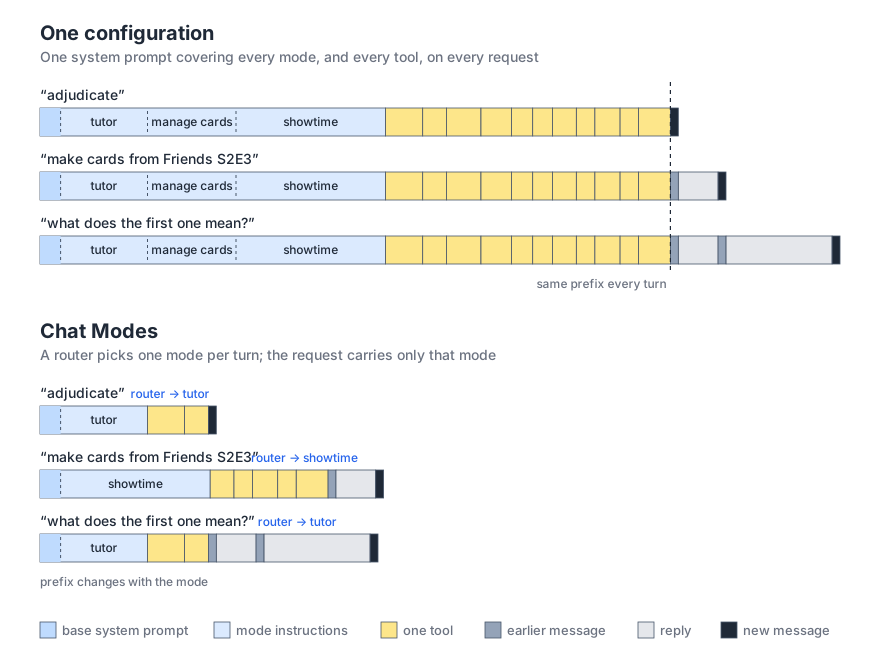
What a request carries on each turn: one configuration vs. modes
The cost of one-size-fits-all
The simplest option for mixed requests is one configuration for the whole conversation: a shared system prompt, a shared set of tools, and one good model for every kind of turn. Skills in this setup are all attached up front too, and the model decides which one the turn needs. It is simple, but you pay for that simplicity on every turn.
Tools and skills attached up front travel in every request, although a given turn needs only some of them. Latency and cost grow with the context.
The more similar tools the model sees, the more often it picks the wrong one, and a wrong pick costs another round trip.
One configuration means one thinking effort for every case. Explaining a word quickly needs no reasoning, while a five-step tool workflow needs it.
The decision about which tool or skill to use is made by the answering model inside its own turn. It is not a separate boundary in the application that you can test independently of the reply.
Most LLM libraries let you change the model, tools, and thinking before every turn. The question is how to organize that so the configuration logic does not end up scattered across conditionals in the request handler.
Chat modes
I use the term chat mode, or just mode, for a named configuration of one turn: instructions, tools, model, and thinking effort, described together under one name. A separate router chooses between modes. This is not several agents handing a task to each other; it is one chat whose configuration is chosen anew before every reply.
Two things are fixed:
the part of the system prompt shared by all modes, which may be empty;
the visible message history.
Everything else is decided on each turn:
message and history → classifier → mode → configured chat → reply
A small classifier looks at the last message and the history and decides what the user wants right now: explain a word, work with flashcards, deal with a TV show, or ask a clarifying question. The next message goes through the classifier again, and the mode may change.
The key property of this scheme is that the boundary between behaviors is made explicit: there is a finite set of named configurations — modes — and a separate, observable router decision. The model that answers the user never sees the tools and instructions of other modes, because the choice was made before it and the chat is built for the turn: in Rails the chat record is loaded per turn, so nothing carries over. Routing and each mode are tested independently.
Each mode also has a short description, and it works the same way as a tool description. The model reads tool descriptions to decide which tool to call; the router reads mode descriptions to decide which mode to pick.
One of the modes can be for clarifying questions. It handles messages that are ambiguous on their own: “delete it” with no card on screen, where guessing means risking the wrong action. In my app this mode is called clarify. It is not the same as fallback. Fallback kicks in when the classifier could not choose; the clarifying mode is something the classifier chooses confidently, because asking a question is the right response here. To the router it is an ordinary mode: its own description, a short prompt, low thinking effort, and no tools.
The classifier
Intuition says the classifier should slow everything down: it is one more model call before every reply.
In my chat, the opposite happened, even before Jev, with a plain chat model, Gemini 3.5 Flash-Lite. Picking a mode takes under a second. In return, the answering model gets a short prompt, only the tools it needs, and a matching thinking effort. Replies got faster, and the model picked the wrong tool less often.
Jev is a new kind of model: it does not generate text. You give it a question with answer options, and it returns a probability for each option. Routing has exactly that shape: here are the mode descriptions, here are the last messages, who should answer. That makes routing one judge call instead of a structured-output chat call.
Numbers from my chat: the same turns through both classifiers. The Jev measurement was taken from Europe with the server in North America, so the time includes network overhead.
Gemini 3.5 Flash-Lite
Jev
routing time, median
765 ms
351 ms
cost of 1000 routing turns
$0.29
$0.04
After switching from Flash-Lite to Jev, the decisions on my data matched almost 100% of the time.
Both classifiers also report how sure they are, but this confidence means different things. For Flash-Lite it is the model’s self-assessment. Jev returns a full probability distribution over the modes, and confidence shows how concentrated it is on one option. So a confidence threshold must be tuned for each classifier separately.
When the router is not sure
The classifier can be unsure, and it can fail. For both cases the router has a fallback mode and a confidence threshold. The router also returns the data behind each decision: what the classifier returned, its probabilities and confidence, whether fallback fired, and how long it took. I write this into the message meta. Here is the record for “exit the card”, sent with a card open:
Here manage_cards got the highest probability, but the distribution was not concentrated enough: confidence 0.4 against a threshold of 0.5, so the router took the fallback tutor. On the same turn, Flash-Lite reported 0.95 for manage_cards, and the router would have gone straight there. When the intent is known without a classifier, for example the user clicked a button in the UI, the code can set the mode directly (router.force("manage_cards", chat:) in the gem below), and the record shows that too: decided_by: caller.
Limitations
Modes help when different kinds of turns need different settings. If almost every turn in your chat ends up in the same heavy workflow anyway, there is nothing to separate, and routing only adds a step. The router also picks one mode for the whole turn: if one message mixes tasks from different modes, it will not split them. For that you need a broader mode or a separate decomposition step.
Modes are close to tool search: both narrow what the answering model sees. Tool search does it for tools only, and it helps when one kind of work has dozens of tools. A mode also changes the prompt, the model, and thinking effort, so it helps when the kinds of work themselves differ. The two can be used together.
The cost I noticed is prefix caching. With one configuration, every request starts with the same instructions and tools, and the provider’s prefix cache hits well. Mode instructions go before the history, so when the mode changes, the prefix changes too, and that turn misses the cache. While the mode stays the same, the cache works as usual. In my chat, routing gives more than this takes away.
RubyLLM::Modes
Everything above works in any stack. In Ruby, I packaged it as a gem on top of RubyLLM.
Modes
RubyLLM already provides RubyLLM::Agent, a class that declaratively defines a turn’s configuration (instructions, tools, model, and thinking) and applies it to an existing chat. It is a ready-made base for a mode.
A mode adds one more field to that configuration: description, the same macro that RubyLLM::Tool has. RubyLLM::Modes adds RubyLLM::ModeAgent, a subclass of Agent with this field, and a router that reads it.
classTutorAgent<RubyLLM::ModeAgentdescription"Explains words and grammar, corrects the learner, keeps the conversation going. A bare word or phrase is a request to explain it."instructions"You are a patient language tutor."thinkingeffort: :lowendclassManageCardsAgent<RubyLLM::ModeAgentdescription"Creates, edits, or deletes flashcards. Only when the learner asks for it, never inferred from a word alone."instructions"Manage the learner's flashcards with the tools."toolsCreateCard,UpdateCard,DeleteCardthinkingeffort: :mediumend
If your app already has its own agent base class, extend it with RubyLLM::Modes::Mode instead:
The router lists the modes, gives the classifier its own instructions (here: that a flashcard is open on screen), declares a fallback mode, and chooses which classifier to use:
classChatModeRouter<RubyLLM::Modes::Routerinputs:user,:cardmodeTutorAgentmodeClarifyAgentmodeManageCardsAgentmodeShowtimeAgentinstructionsdo"The learner has a flashcard open on screen."ifcardendhistorylast: 6fallbackTutorAgent,below_confidence: 0.5classify_with:judgeend
Applying it on each turn takes three lines. The message goes into the chat, the router picks the mode, the mode configures the chat and runs the turn:
ask_later is RubyLLM’s own: ask is ask_later followed by complete, and the router sits between the two. By default it reads the conversation from the chat and routes the last user message. As context it takes only the text the user and the assistant exchanged before it: the system prompt, tool calls and their results are left out, because they help the answering model and only distract the classifier. In Rails, ask_later saves the message, so a job that runs route and complete later sees the same chat.
When the stored messages are not the conversation the user saw, give the router its own list of messages instead: route(chat, messages: routing_messages). Any object with each over { role:, content: } entries will do; the router reads it the way it reads the chat. In my app the reply is JSON with the text inside, some messages are hidden from the learner, and the assistant often answers with UI rather than words: a picker, an offer to create a card. So the list carries the extracted text, a line for what the UI showed and what became of it, and the mode that answered each turn. The list is for the classifier only; the mode still runs on the same chat.
classify_with :judge uses Jev through RubyLLM.judge. Judge is a new feature in RubyLLM: it is on the main branch and is not in a release yet.
Try it
Code and examples are on GitHub, the package is on RubyGems.
I came to this approach out of real need, while I tuned and optimized my chats on the previous generation of models. It worked even then, but with Jev it feels complete: routing is now fast and cheap enough to run on every turn without a second thought. That is why I turned it into a gem and published it.
If your chat also mixes quick questions with heavy tasks, give modes a try. Start with two of them, and look at what the router log tells you. I would be glad to hear how it goes.
]]>Andrey SamsonovSequence Is Not Structure: Getting Lost in Long LLM Conversations2026-07-28T00:00:00+00:002026-07-28T00:00:00+00:00https://msg.samsonov.io/sequence-is-not-structureOne of the prompts I use most often now is: “Explain this to me as if I were a smart ten-year-old.” The models have become good enough to outrun me. They can generate a dense argument in seconds; I may need an hour to understand it and fit it into everything else we have discussed. The bottleneck is no longer the model but me.
I usually open a session full of enthusiasm, with a question that has been circling at the edge of my mind and has finally taken shape in words. The LLM points out what I have missed, each question produces five more, and the field of inquiry expands without anything pulling it back toward an answer. The dopamine hits; I feel very smart. Three hours later, I have ten interesting directions, no answers, and only a vague memory of where I started.
A lot of my longer sessions begin to feel like Lost: every answer opens another interesting mystery until there are more threads than any ending could possibly resolve. Plenty of intrigue, no meaningful conclusion.
Chat is often an excellent interface, but it exposes little of the conversation’s structure. This becomes especially limiting in long exploratory conversations, where the question itself evolves and the dialogue becomes part of the thinking process.
Text became cheap. Understanding did not.
For most of human history, every additional line of text consumed material, time, and labor. The medium imposed a kind of conservation law: ideas were compressed partly by the cost of reproducing them.
LLMs removed most of the cost of producing another page. Chat often feels like llm | human, except the human side is lossy: most of the output gets dropped before I can integrate it.
When the stream becomes unmanageable, I ask the model to turn it into another text: a summary, a plan, a specification, a handoff. These artifacts are useful, often necessary. But compression is lossy: it makes the conversation manageable by discarding some of the detail and connections that made it valuable in the first place.
What I want is not simply less text, but another way to hold its structure. We gave text infinite room to expand, but gave thought no coordinates.
Thinking in space
I keep returning to a familiar scene: people thinking together around a whiteboard or a table covered with notes. They talk, but they also draw, connect, rearrange, and point. The conversation occupies space.
Plato's Academy, mosaic from Pompeii, 1st century BC. The stick is what holds the attention in one place.
A teacher can draw an empty circle, spend five minutes explaining it, and then return to the whole argument by pointing at the circle again. The students do not need the explanation repeated. The circle has acquired a location and a history. It has become a place inside the conversation.
The blackboard keeps the whole argument in view at once.
Sequence is not structure
Chat has no equivalent of that circle. Every idea enters the same vertical stream and becomes another message. Forty messages later, an important thought is still there, but nothing in the current view points back to it. I have to remember that it exists before I can search for it.
A transcript preserves sequence, but sequence is not structure. A line of thought can branch, stall, merge with another, or remain unfinished. Chat flattens all of this into before and after. It shows only the order of messages and the distance between them.
This is what makes drift so difficult to notice. Every reply can be useful on its own and follow naturally from the one before it. There may be no single wrong turn. Yet after a few hours, I can find myself deep inside a secondary detail, with several important questions left unresolved behind me. The conversation moved through twenty reasonable steps, but I can no longer explain where it is going.
Change is not drift
An exploratory conversation should be allowed to change direction. A new branch may be a discovery, a useful pivot, or the natural evolution of the original idea. It becomes drift when the transition goes unnoticed — when we can no longer explain how we got here or what we left unresolved behind us.
A missing dimension
I wonder whether long exploratory conversations could grow a visual structure alongside the text. It would evolve with the conversation, making ideas and their relationships visible instead of compressing them into another document afterward.
What I miss in those sessions is orientation: I want to see the conversation as a whole, understand the relationships between its parts, and know where the current line of inquiry sits inside it. The transcript tells me what came before. It does not show me where I am.
Notes help once a thought has settled. During exploration, they can be stale four messages later because the question itself has changed. Branching leaves me with two transcripts to get lost in instead of one.
Maybe the answer is simply a canvas beside the chat. I have not used one enough to know whether maintaining it by hand provides orientation or becomes another system to manage.
I also have no idea what an automatically growing layer should look like. A graph can turn into spaghetti even faster than a chat turns into a wall of text. This post is mostly a structured dump of accumulated frustration — which I have, appropriately, expressed by producing yet another long text artifact.
If you have found a way to stay oriented in long conversations with LLMs — not merely summarize them afterward, but keep track of their shape while they unfold — I would really like to hear about it.
]]>Andrey SamsonovMoving Active Storage Between Buckets Without 404s2026-07-11T00:00:00+00:002026-07-11T00:00:00+00:00https://msg.samsonov.io/zero-downtime-active-storage-bucket-migrationI recently had to move the user uploads of a live Rails application to a new S3 bucket. There were several million objects totaling more than a terabyte, and users kept uploading images, PDFs, and other files throughout the move.
Copying the bucket and switching the configuration wasn’t quite enough. During the final sync, some recent uploads would still exist only in the old bucket. Switching reads to the new one at that point would temporarily turn those files into 404s.
I solved this with a small Active Storage service: new files go to the new bucket, while reads try the new bucket first and fall back to the old one on a miss.
The important detail here is to rescue ActiveStorage::FileNotFoundError, not the S3 provider’s error. The standard S3Service has already wrapped it by this point.
We use Active Storage in proxy mode, so the fallback happens inside Rails and is invisible to the client. The url method provides the same behavior in redirect mode, at the cost of an extra HEAD request whenever a file is served during the migration.
The wrapper has to use the existing service name—production in my case. Active Storage stores that name in active_storage_blobs.service_name for every blob. Give the wrapper a new name and existing blobs will continue to use the old service directly.
The migration itself was straightforward:
Copy most of the files to the new bucket in advance, if possible.
Deploy the fallback service. From this point on, new files go to the new bucket and the old one is only needed for reads.
Run rclone copy from the old bucket to the new one.
Verify the result with rclone check.
Once there are no differences, remove the wrapper and point the regular S3 service at the new bucket.
rclone copy is safe to restart. I ran it from a small VM close to the buckets. With several million objects, each pass took about 35 minutes almost regardless of the size of the delta.
Two more details that are easy to forget:
If you use direct uploads, copy the CORS configuration to the new bucket before switching.
Don’t delete the old bucket immediately. Keep it around briefly as a rollback source.
Active Storage’s built-in Mirror service wasn’t quite enough for this. It writes to multiple services but reads only from the primary, so the migration still ends with a hard switch that requires the new bucket to be complete. The fallback service let me switch writes first, finish copying at leisure, and remove the wrapper only after verifying the result.
In the end, several million files moved without downtime or broken images. All it took was a small Ruby class and two rclone commands: copy and check.
]]>Andrey SamsonovGenerative UI in Rails with RubyLLM2026-05-21T00:00:00+00:002026-05-21T00:00:00+00:00https://msg.samsonov.io/generative-ui-ruby-llmChat is a natural interface for LLMs, and a lot of things work well inside it. But visual responses — cards, buttons, choices, inline widgets — have already become a baseline user expectation: tables and charts in ChatGPT answers, quick replies in support bots, forms and confirmations in banking assistants.
I want to give the model that same freedom of form in my Rails app — without letting it generate the HTML directly. Let the LLM choose what to show; the application still decides how to render it.
Plain chat: text
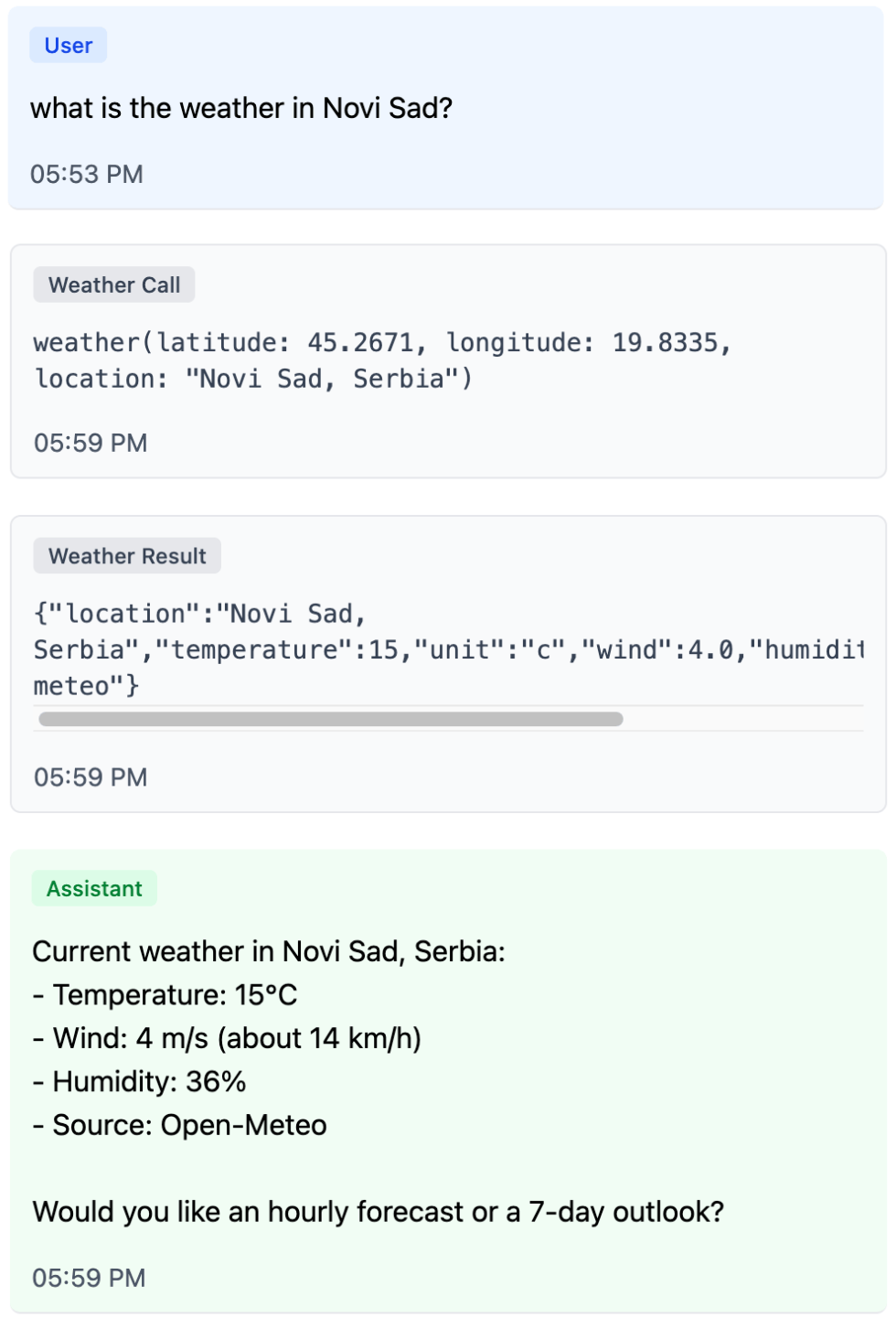
Let’s spin up a chat on RubyLLM and give it one ordinary tool right away — a weather data source:
rails new chat_app --css tailwind
cd chat_app
bundle add ruby_llm
bin/rails generate ruby_llm:install
bin/rails db:migrate
bin/rails generate ruby_llm:chat_ui
bin/rails g ruby_llm:tool Weather
classWeatherTool<RubyLLM::Tooldescription"Get current weather for a location."paramsdonumber:latitudenumber:longitudestring:locationenddefexecute(latitude:,longitude:,location:)Weather::OpenMeteo.fetch(latitude:,longitude:,location:).to_jsonendend
Now the chat can fetch data — and by default it answers with text.
The most direct way to make that answer more visual is to render the tool result nicely. That’s how many chat-based agents work: instead of raw JSON the user sees a card with the result of the tool the model called.
Tool-result UI answers the question “what did the agent just do?”.
Generative UI answers “what form of response is most useful to the user right now?”
Showing tool results is useful: the user sees which tools the model called and what data it worked with. But the more internal steps an agent takes, the more a detailed log of its work starts to crowd the main interface. Generative UI solves a different problem: instead of painting in the whole execution trail, it lets the model choose the form of the final answer.
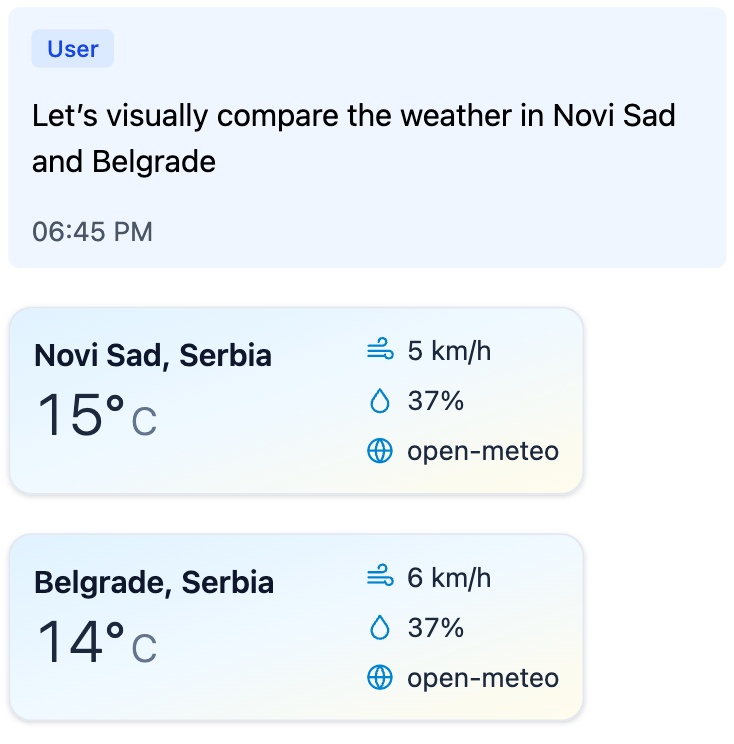
What if, instead of visualizing the result of WeatherTool, we wanted the model itself to ask for a weather card to be shown?
Generative UI with Per-Component Tools
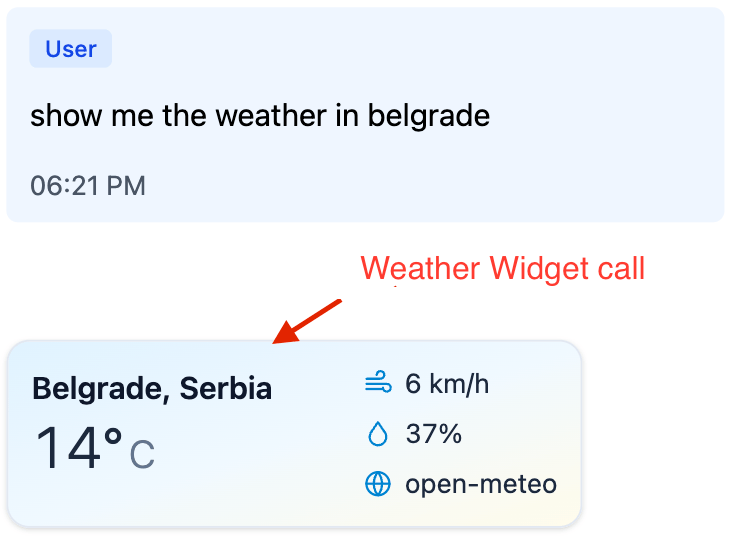
For the view layer to render a component, it needs two things: a component name and attributes (often called props). A tool call already has both: the tool name and its arguments. That’s the first important shift — the data for the UI lives not in the tool’s result, but in the arguments of the call itself. Which means we can introduce a dedicated tool for this component: one that computes nothing, and just serves as a render signal.
classWeatherWidgetTool<RubyLLM::Tooldescription"Render a weather widget inline in the chat."paramsdostring:locationnumber:temperaturestring:unit,required: falsenumber:wind,required: falsenumber:humidity,required: falseenddefexecute(location:,temperature:,unit: "c",wind: nil,humidity: nil)errors=[]# validate attributes...errors.any??{status: "invalid",errors: }.to_json:{status: "ok"}.to_jsonendend
The tool result here is deliberately short. Its job isn’t to carry UI — only to tell the model whether the arguments were accepted. If you put HTML or the full component data into the tool result, the model will see it on the next step and is very likely to start paraphrasing what’s already on screen. halt looks tempting, but it pulls the conversation into a different problem: the history ends up with an “assistant message” that the assistant never actually wrote.
The view’s only job left is to read the arguments of the parent tool call and render an allow-listed component:
One small catch: even with a minimal tool result, the model still tends to add a prose reply under the rendered widget. The cleanest fix is to tell it in system instructions that the widget tool call is the answer — we’ll come back to the same trick with generate_ui below.
For a single component this already works well: the UI component lives outside the model, and the model just picks it and fills in the attributes. But the approach hits a ceiling fast.
The Limits of Per-Component Tools
The weather card is useful on its own, but the next step is more interesting: the model can pick on the fly between cards, containers, buttons, forms, and confirmations — and assemble a response shaped to the task. The same primitives can combine into useful scenarios the developer never planned for. For that you need a shared UI vocabulary, not a separate tool for every new scenario.
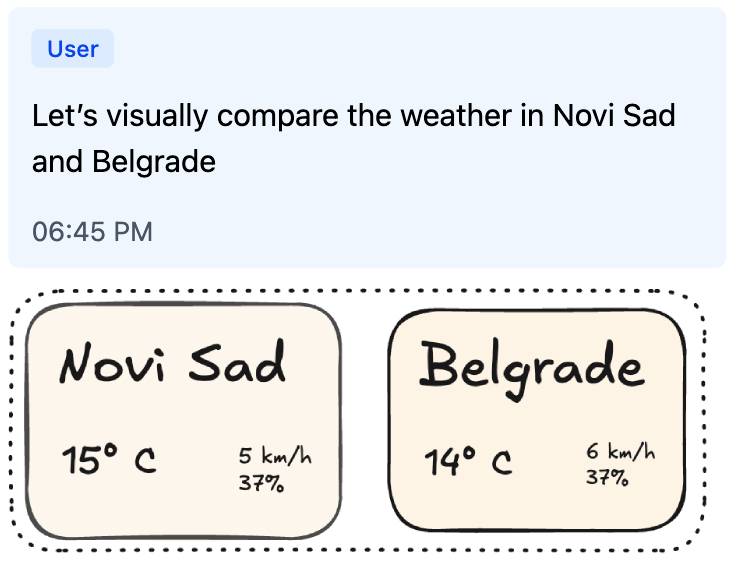
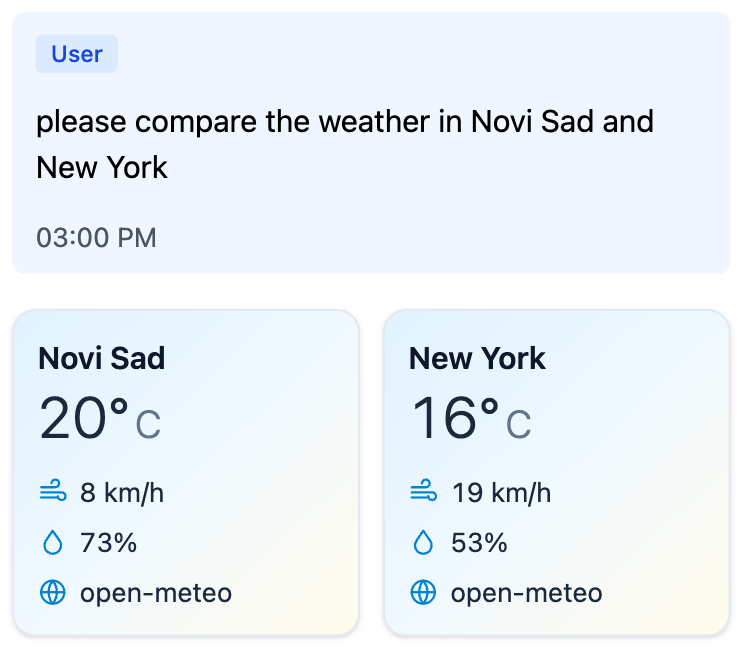
Ask the model to compare the weather in two cities, and it calls WeatherWidgetTool twice and shows two cards. But comparison as a structure never appears: the cards just stack on top of each other.
Actual: just widgets
Target: composed components
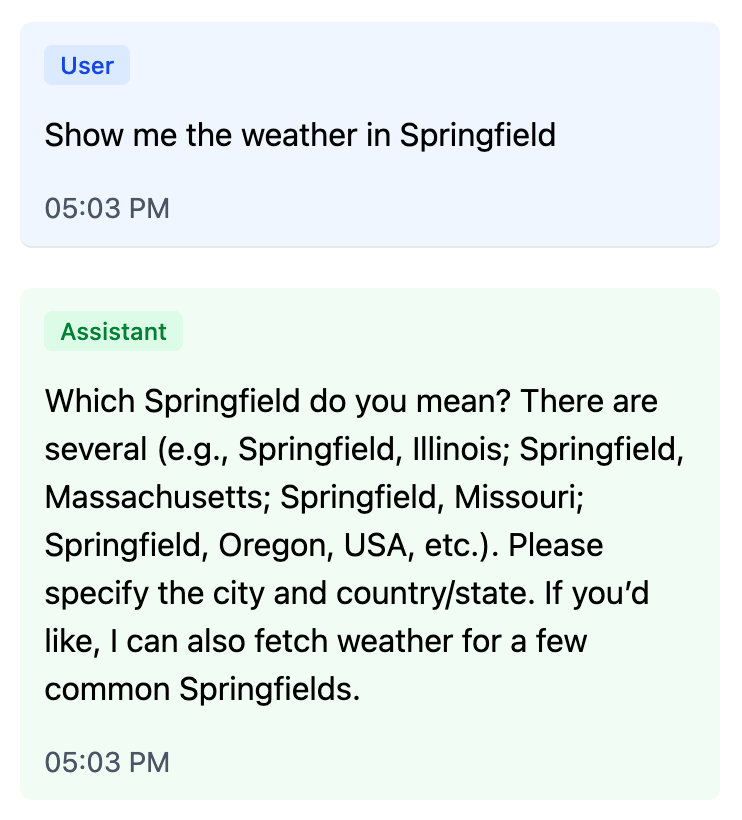
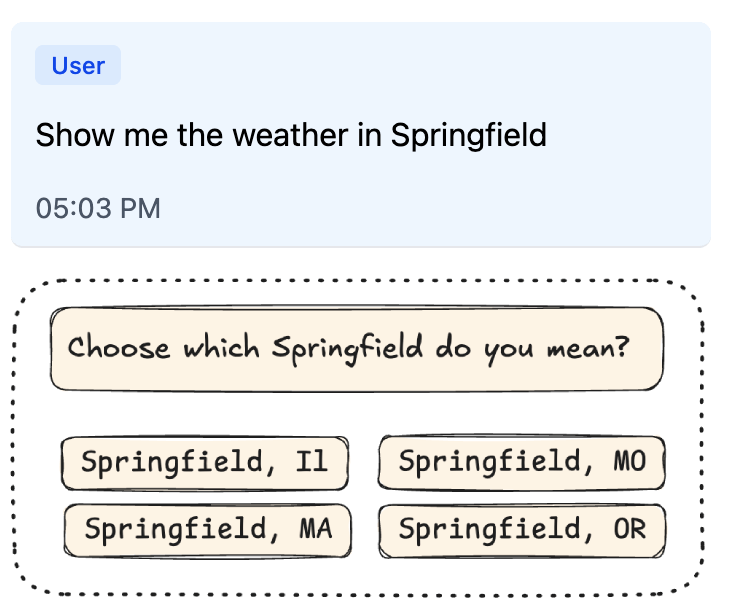
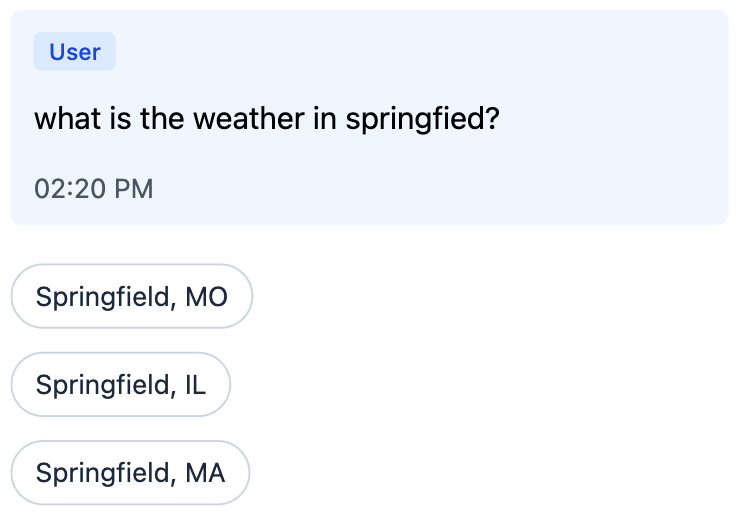
Another familiar case is clarification. A user asks the assistant: “What is the weather in Springfield?” The assistant thinks, calls some tools, and then instead of answering writes: “Which Springfield did you mean?” — forcing the user to type the city or state all over again. Springfield is ambiguous, so the clarification has to happen. The real question is how the user answers it — typing the city or state again, or picking from options with a single click. The interface can do better here: show a picker right away, where the user’s next turn is one tap. The renderer just shows the buttons; turning a click into a new message is the application’s job.
Actual: just text
Target: interactive picker
Both cases can be solved with dedicated tools: WeatherComparisonTool for comparison, CityPickerTool for clarification, then ConfirmationTool for confirmations. For a simple product this is a perfectly fine path. The limit shows up later: the catalog starts to grow not by the number of reusable primitives, but by the number of scenarios. Every new UX gesture demands a new top-level tool.
One Tool to Compose Them All
This points to a different move: keep one general-purpose tool for generative UI, and pass the entire response structure as its argument instead of a single component. Let’s call it generate_ui. Same idea — tool call as UI payload — only now the arguments hold not one card, but the whole component tree.
The structure is easiest to pass flat: a single components array, one component with id: "root", and connections between components as plain id references. The component catalog shows up directly in the payload: each node names its own component and carries the attributes declared for it.
This is still a tree in normalized form: one root, references only by id, no cycles, no orphans, no child reused in two places. But now the link between the wire format and the catalog is direct. If a node says component: "WeatherCard", it carries that component’s attribute schema. If Comparison.items is declared as a list of component references, the application can check not just the array type but that the items inside really are weather cards.
With this shape, both earlier cases become compositions rather than new top-level tools: Comparison wraps two WeatherCards, and Picker wraps several QuickReplys.
`Picker` + three `QuickReply`s give a clarification flow without a separate `CityPickerTool`.
`Comparison` + two `WeatherCard`s give a side-by-side comparison of two cities.
The simplest hand-rolled version looks like a single presentation tool. It fetches nothing and has no side effects. It accepts a UI tree, validates it, and returns a short status.
In the example below, params describes the shape of individual components, and UiTree.validate would be the application’s validator for whole-tree invariants: exactly one root, all references resolve, no cycles, no orphans, no child reused in two places. COMPONENT_CATALOG here is the same kind of hand-rolled Ruby structure that lists the available components and their relationships. The code of the validator and that structure isn’t what matters here; what matters is the boundary itself — the schema helps the model hit the expected shape, but the application still treats the result as an external payload before rendering.
classGenerateUiTool<RubyLLM::Tooldescription<<~TEXT
Render inline UI from the available component catalog.
Arguments:
- components is a flat array of component instances.
- One component must have id="root".
- Component reference fields point to other component ids.
- The accepted payload must form one rooted tree.
Available components:
- WeatherCard: show current weather for one location.
- Comparison: compare several weather cards side by side.
- Picker: ask the user to choose between ambiguous options.
- QuickReply: clickable option that sends a short reply back into the chat.
TEXTparamsdoarray:componentsdoany_ofdoobjectdostring:idstring:component,enum: ["WeatherCard"]string:locationnumber:temperaturestring:unit,enum: %w[c f]endobjectdostring:idstring:component,enum: ["Comparison"]array:items,of: :string,min_items: 2end# ...and the same kind of schema for Picker and QuickReply.endendenddefexecute(**args)errors=UiTree.validate(args.fetch(:components),catalog: COMPONENT_CATALOG# same catalog, now used by the server validator)errors.any??{status: "invalid",errors: }.to_json:{status: "ok"}.to_jsonendend
If the tree is invalid, the model gets a short list of errors and can correct itself on the next step. If the tree is valid, the application can take the arguments of that call and render them as the response to the user.
This sketch shows the mechanics — and at the same time exposes what’s missing: a single place where the catalog is assembled. The catalog is needed by several parts of the system at once:
the LLM — so it knows from system instructions which components are available and when to use them;
the provider — to derive the JSON Schema for the generate_ui arguments;
the server — to validate the tree, component references, and attributes before rendering;
the view layer — to know how each component should be rendered.
If these four views live separately, the UI tool quickly turns into a set of conventions you have to keep in sync by hand. So we need a single Ruby catalog from which instructions, schema, validation, and render targets are all derived.
Same UX trick as with the widget tool earlier: the system instructions should tell the model that calling generate_uiis the answer — no final text needed. The wiring is shown in the system prompt below.
The GenerativeUI gem
GenerativeUI starts from a single idea: describe UI components once in a catalog, and derive everything else from it. In the current Rails/RubyLLM integration this catalog is wired up through the generate_ui tool, but the heart of the library isn’t the transport — it’s the catalog DSL. The demo app shows everything wired together end-to-end.
classApplicationGenerativeCatalog<GenerativeUI::Catalogcomponent"WeatherCard"dodesc"Show current weather for one location."attributesdostring:locationnumber:temperaturestring:unit,enum: %w[c f]string:condition,required: falsenumber:wind,required: falsenumber:humidity,required: falseendpresent_with:partial,"generative_ui/weather_card"endcomponent"Comparison"dodesc"Compare several weather cards side by side."attributesdomany_components:items,only: "WeatherCard",min_items: 2endpresent_with:partial,"generative_ui/comparison"endcomponent"QuickReply"dodesc"Clickable option that sends a short reply back into the chat."attributesdostring:labelstring:valueendpresent_with:partial,"generative_ui/quick_reply"endcomponent"Picker"dodesc"Ask the user to choose between ambiguous options."attributesdostring:promptmany_components:options,only: "QuickReply"endpresent_with:partial,"generative_ui/picker"endend
This single declaration captures everything we used to keep in sync by hand:
the component name in the payload (WeatherCard, Comparison, Picker);
the description for the LLM (desc);
the attribute schema (attributes);
the structural relationships between components (one_component, many_components);
the render target for the application: convention-over-configuration by default, with present_with to point at a specific partial or component.
From this catalog the gem derives component descriptions for the LLM, the schema for generate_ui arguments, tree validation, and render targets.
The catalog can be registered as the default so you don’t have to pass it explicitly to every tool and render call:
tool=GenerativeUI::Tool.newchat=Chat.create!chat.with_instructions(<<~PROMPT)
You are a helpful weather assistant.
Tool guidance:
- Use generate_ui when the answer should be shown as UI.
- IMPORTANT: after calling generate_ui, do not add a final text answer.
The tool call itself is the user-visible UI response.
PROMPTchat.with_tool(tool)chat.ask("Compare the weather in Novi Sad and Belgrade.")
GenerativeUI::Tool takes the selected catalog, merges its description into the tool description, and compiles the provider-facing JSON Schema for the arguments. At call time the tool validates the tree and returns a short result: { "status": "ok" } or { "status": "invalid", "errors": ... }.
In Rails views, the user-facing UI is rendered from the tool call’s arguments:
The tool’s status result is best hidden from the user:
<%# app/views/messages/tool_results/_generate_ui.html.erb %><%# intentionally empty: { "status": "ok" } is control data, not UI %>
By this point the tree has already passed the catalog + validator check. The partial doesn’t decide whether the component can be trusted; it just receives the validated attributes and turns them into HTML.
The partial is just one of several render paths. The gem can also render through ViewComponent or return a JSON representation of the tree; if you need something else, the application can register its own renderer.
One caveat worth naming: even with explicit system instructions, models sometimes still add a short prose answer to a turn that already produced a generate_ui or widget tool call. The behavior varies between providers, models, and even individual requests. If the duplication matters for your product, the application can handle it on the view side — for example, by suppressing trailing assistant text on turns that already rendered UI. It’s a small ergonomics layer, not a structural problem with the approach.
Where this leaves us
Generative UI today means very different things to different people: from polished rendering of tool results to an interface that rebuilds itself in real time around the user’s intent.
I tried to focus on something more down-to-earth: what you can do right now in an ordinary chat-based application — without a custom runtime, without HTML generated by the model, and without rebuilding the product from scratch. All it takes is to give the LLM not the whole screen, but a strictly described yet composable catalog of components.
In this approach the model doesn’t draw the interface directly. It picks from allowed primitives and assembles a response tree out of them. The application validates that tree and renders it with its own renderers. Because of that, the final UI isn’t tied to one platform: the same generative payload can be shown on the web through Rails partials, in a mobile app through native components, and in Telegram or WhatsApp — through their buttons, lists, and messages.
Generative UI is no longer just “a chat with widgets,” but it hasn’t settled into one canonical pattern yet either. A good way to find out where its real shape lies is to assemble a small catalog of components and try it out in a live conversation.
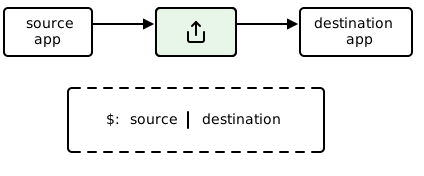
]]>Andrey SamsonovShare Extension Auth in iOS 18: Four Approaches Compared2026-01-14T00:00:00+00:002026-01-14T00:00:00+00:00https://msg.samsonov.io/ios-18-share-extension-for-unauthenticated-userFor years, the Share icon on mobile was just visual noise to me — something that kept appearing everywhere but I never used. Then something clicked: Share is like a Unix pipe. You take content from one app and send it to another in one action. No copy-paste, no saving files, no searching for “import” — just pick the next tool and continue the chain. The only difference is that instead of a stream, Share passes a package (a link, text, a file, or several photos).
share ≈ pipe
The problem is that Unix pipes live inside a single user environment, while Share crosses app boundaries: separate sandboxes, separate processes, separate security rules. So the task “pass data” quickly becomes “pass data in the user’s context”: the receiver needs to know who the current user is and where to put this package. In my case: a user shares a link to my app, but processing happens on the server, so the user needs to be authenticated first. What do you do when a Share request arrives but there’s no session — or the session isn’t available right now?
The naive solution: “just open the app”
The first idea that comes to mind: the extension detects that the user is not logged in and opens the main app. The user logs in, goes back to Safari, taps Share again — and now everything works.
This pattern worked for years. Share Extension acted as a launcher: it detected a problem, passed control to the main app, and closed.
In iOS 18, this stopped working.
What Apple broke (and why it’s not a bug)
When you try to open an app from a Share Extension in iOS 18, you get an error:
LSApplicationWorkspaceErrorDomain Code=115
This is not a bug or a temporary regression. Apple explicitly states that app extensions are not allowed to open URLs directly; runtime workarounds are being blocked. If you need the user’s attention — use a local notification.
Cold start / Warm start
In my experience, extensionContext.open(...) sometimes works when the app is already in memory — but you can’t control or predict that, and it’s not documented. The user might have closed the app an hour ago, and the call will silently fail.
What Apple recommends instead of openURL
On the same forum, Quinn writes:
“If your app extension needs to get the user’s attention, do that by posting a local notification.”
The idea is that an extension should not be a trampoline to the main app — it should handle the task on its own. If it can’t — it should just tell the user via a local notification.
Old hacks no longer work
If you googled this problem before, you probably saw the UIResponder chain “hack”:
// THIS NO LONGER WORKSvarresponder:UIResponder?=selfwhileresponder!=nil{ifletapplication=responderas?UIApplication{application.perform(#selector(openURL(_:)),with:url)break}responder=responder?.next}
Starting with iOS 18, this code throws a sandbox error (NSOSStatusErrorDomain Code=-54). The system checks the call stack and blocks attempts to bypass restrictions.
How Apple’s own apps do it
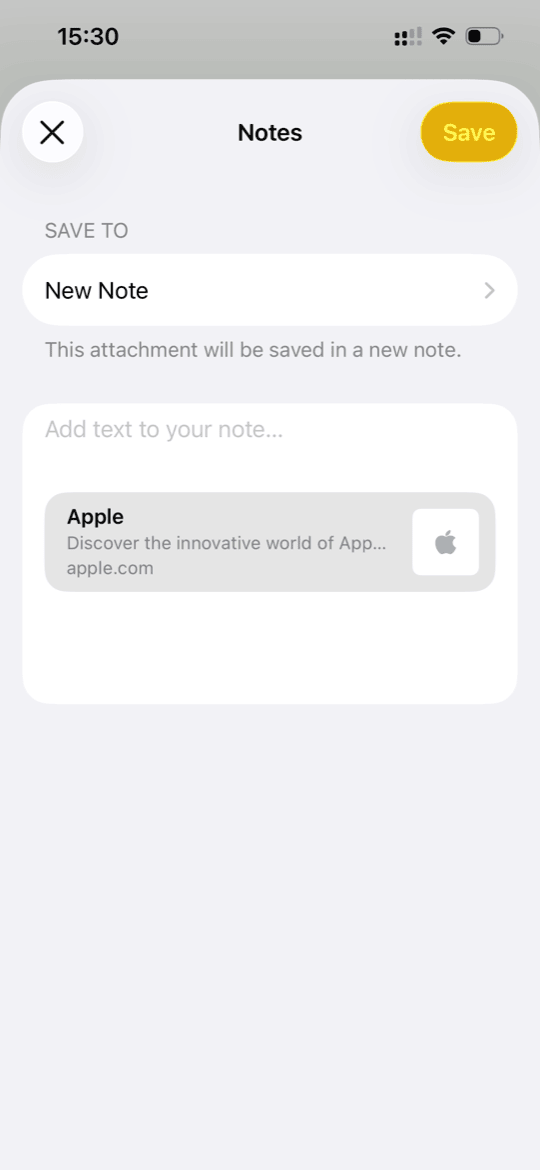
Notes Share Extension
It’s interesting to see how Apple solves this problem in their own apps. Here’s what I found:
Notes: when sharing a link to Notes, the extension shows a folder picker, you tap “Save” and… you stay in Safari. The note is saved via background sync, and you only find out when you open Notes.
Photos: same approach — the extension saves to a shared container, sync happens in the background.
Messages: if you select a contact from “suggestions” in the Share Sheet, the system itself opens Messages. This is a system-level path, not openURL from an extension.
So Apple’s apps either don’t open the main app at all, or they use privileged system mechanisms that are not available to third-party developers.
Working solutions
Solution A: Shared Keychain — the extension handles auth on its own
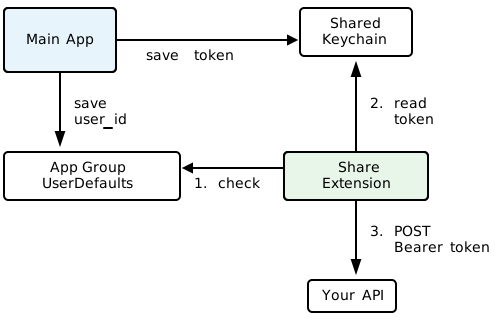
Main App saves token to Shared Keychain; Share Extension reads it directly
The best solution is to make the extension autonomous. If the extension has access to the auth token, it can send data to the server by itself, without touching the main app.
The idea is simple: the main app saves the token to Keychain with a shared access group when the user logs in, and the Share Extension reads it and makes the API request itself.
// In the main app during login:letquery:[String:Any]=[kSecClassasString:kSecClassGenericPassword,kSecAttrAccountasString:"authToken",kSecAttrAccessGroupasString:"group.com.dropkind.shared",kSecValueDataasString:token.data(using:.utf8)!]SecItemAdd(queryasCFDictionary,nil)
// In Share Extension:letquery:[String:Any]=[kSecClassasString:kSecClassGenericPassword,kSecAttrAccountasString:"authToken",kSecAttrAccessGroupasString:"group.com.dropkind.shared",kSecReturnDataasString:true]varresult:AnyObject?SecItemCopyMatching(queryasCFDictionary,&result)
The main advantage is perfect UX: the user taps “Save” and stays where they were. You just need to set up Keychain Sharing between targets and make sure the token is available (not expired, not revoked).
Important detail: Keychain can survive app deletion, so you can’t rely on automatic cleanup. Imagine this scenario: a user logged in, deleted the app, created a new account a year later (for example, in the web version of your service), installed the app, and immediately used Share — the extension would find the old token and send data to the wrong user.
The fix: App Group UserDefaults, unlike Keychain, gets deleted with the app. Store currentUserId in UserDefaults and check for it before using the token:
// In Share Extension:letshared=UserDefaults(suiteName:"group.com.dropkind.shared")guardshared?.string(forKey:"currentUserId")!=nilelse{// UserDefaults is empty → app was reinstalled → require loginreturn}// Only now trust the token from Keychain
Solution B: App entry via local notification
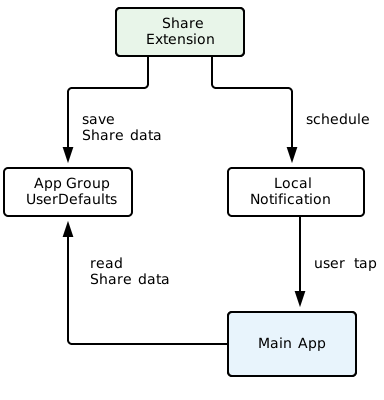
Share Extension saves data and schedules a notification; Main App completes the flow when user taps
If the extension can’t open the app programmatically, let the user do it by tapping a local notification:
Extension detects there’s no session
Saves data to temporary storage (App Group UserDefaults)
Shows a local notification: “Tap to log in and save the link”
User taps — this is a legitimate action, the system allows the app to launch
// In Share Extension:funcshowLoginNotification(pendingURL:URL){// Save dataletdefaults=UserDefaults(suiteName:"group.com.dropkind.shared")defaults?.set(pendingURL.absoluteString,forKey:"pendingShare")// Schedule notificationletcontent=UNMutableNotificationContent()content.title="Login required"content.body="Tap to log in to DropKind and save your link"content.userInfo=["action":"completeShare"]letrequest=UNNotificationRequest(identifier:"loginRequired",content:content,trigger:nil// Show immediately)UNUserNotificationCenter.current().add(request)}
The implementation is simple and works reliably. The downside is an extra step for the user, and you need notification permission.
In practice: robust API, flaky UX
I tried this approach and found it unreliable in practice:
Users deny notification permission reflexively
Focus Mode / Do Not Disturb suppresses notifications silently
Even delivered notifications get dismissed without reading
Too many steps between “tap Share” and “complete the action”
Local notifications are robust from iOS’s standpoint — Apple recommends it, the API is stable and documented. But they’re flaky from a UX standpoint. Too many points of failure for the user to actually complete the share.
Solution C: OAuth inside the extension
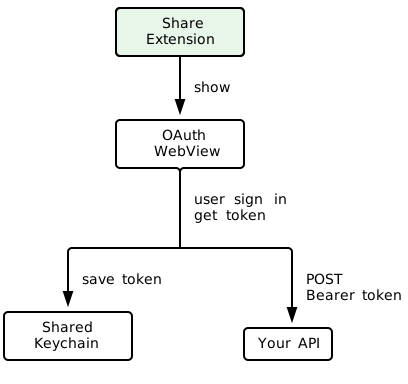
Share Extension handles OAuth flow internally; token saved for future use
The most complex option: implement full OAuth login right in the Share Extension using ASWebAuthenticationSession. The user authenticates without leaving the Share Sheet, the token is saved to Shared Keychain, and future shares work autonomously.
The UX is seamless — but the implementation is a lot of work. Not all OAuth providers play nice with extensions, and ASWebAuthenticationSession has quirks when running outside the main app context.
Solution D: UIWindowScene.open() via responder chain
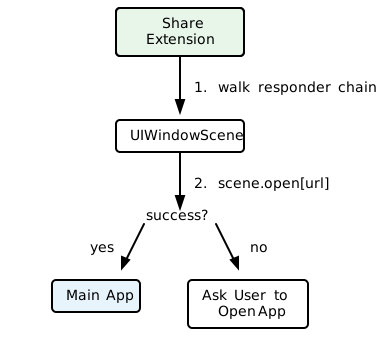
Share Extension walks the responder chain to find UIWindowScene and calls open()
Remember the old UIResponder chain hack that Apple blocked? It turns out there’s a variation that still works on iOS 18+. Instead of walking up to UIApplication, you walk up to UIWindowScene and call its open(_:options:completionHandler:) method:
This works because UIWindowScene.open() isn’t subject to the same restrictions as UIApplication.open(). The system doesn’t block it — at least not yet.
Caveat: This is undocumented behavior. Apple could block it in a future iOS version, just like they blocked the UIApplication approach. Always have a fallback ready.
What I chose
DropKind is a simple app that sends articles and text to your Kindle. You find something interesting while browsing — share it to DropKind, and it lands on your e-reader. The Share Extension is the main entry point: most users discover content in Safari, not in the app itself. So a broken or clunky share flow means a broken product.
For DropKind, I chose a combination of solutions A and D, with a manual fallback. The main path is Shared Keychain: if the user is already logged in to the app, the extension picks up the token and works autonomously. If there’s no token — we try to open the app via UIWindowScene, and if that fails, we show an in-extension prompt.
Implementation details:
1) Separate share-token in Keychain. The main app gets a separate share-token and saves it to Shared Keychain. Share Extension uses this token for direct POST to the API.
2) user_id in App Group. Along with the token, we save user_id to App Group UserDefaults. This serves two purposes: the server verifies the token owner, and the presence of user_id itself is a marker that the app wasn’t reinstalled (UserDefaults gets deleted on uninstall, unlike Keychain).
3) If there’s no token — the extension saves data to App Group and attempts UIWindowScene.open() via the responder chain. This has worked reliably for me on iOS 18.
4) If UIWindowScene.open() fails — the extension shows an in-extension prompt asking the user to open the app manually. This is the final fallback, no notifications involved.
5) The main app finishes the job. On launch, the app checks for pending share data in the App Group, guides the user through login if needed, and completes the share.
Authenticated userUnauthenticated: prompts to open appApp completes the pending share
This approach gives the best UX for most users (those already logged in), but doesn’t break for new users.
Going back to the pipe analogy: grep doesn’t ask you to configure anything — it just works with what it has. A Share Extension should aim for the same, handling auth silently whenever possible.
]]>Andrey SamsonovDictionary-Quality Word Pronunciation Without Dictionary APIs2025-12-19T00:00:00+00:002025-12-19T00:00:00+00:00https://msg.samsonov.io/dictionary-quality-word-pronunciationWhen I started building word pronunciation features for my language learning app, the obvious first idea was to pull audio files from “reputable” dictionaries — Oxford, Cambridge, Collins, etc.
But I quickly ran into limitations:
Access. Getting an API key can be a hassle even for testing.
Rate limits. Restrictions on requests and pricing.
Caching. Storing audio locally is often prohibited — which is a dealbreaker for a learning app.
Vendor lock-in. Once you commit to a specific dictionary (its article structure, response formats, definition markup, pronunciation quirks), adding other languages becomes painful. Each language has its own dictionaries and formats, and stitching them together cleanly gets messy fast.
So I ended up with a solution I’d been avoiding: LLM-based Text-to-Speech. I’d tried similar things a year or so ago — back then, the quality wasn’t good enough for “dictionary-grade” pronunciation. But there’s been noticeable progress in both the models and available APIs since then: with the right setup, the results are now quite practical.
System Instructions: A Separate Channel for Style Control
APIs let you pass system instructions separately from the text. This is useful because you can treat them as a “contract” for pronunciation style:
accent variant: British / American;
delivery: clear, neutral, steady pace — closer to a dictionary narrator than a voice actor.
That’s enough to get consistent “educational” audio instead of “theatrical line readings.”
Heteronyms: The Model Will Be Wrong “Sometimes,” but You Need “Never”
Then came a less obvious problem — heteronyms: words spelled the same but pronounced differently depending on context (part of speech, meaning, tense).
The classic example is read:
present: /riːd/
past: /rɛd/
You can try to tweak the system instructions so the model always picks the right variant from context — but reliability will still be hit or miss. And in a learning app, mispronunciation is a bad experience: the user will memorize the wrong pattern.
IPA Substitution: Explicit Phonetics Instead of Guessing
The most practical trick turned out to be simple: replace the ambiguous word with IPA (International Phonetic Alphabet).
Example:
We read (present) → We /riːd/
We read (past) → We /rɛd/
You turn ambiguous spelling into unambiguous phonetics, and TTS no longer “guesses” — it just pronounces exactly what you’ve specified.
IPA on Demand
You don’t want to generate IPA for all text all the time: it’s more expensive and more complex. So here’s the approach:
Check the text: does it contain any words from a small list of heteronyms (a candidate dictionary)?
If not — send it straight to TTS.
If yes — make an additional request to an LLM tuned for the short task “pick the correct pronunciation”:
word + sentence/context;
(optionally) structural hints from your context, e.g.: {pos: "verb", tense: "past"};
output: IPA or a choice between variants.
Replace the word in the text with /ipa/.
Send the “phonetic-ready” text to TTS.
The key idea: the extra request only fires when there’s a real risk of mispronunciation.
The Final Pipeline
Before:
text → TTS LLM → audio
After:
text + context + user-prefs → heteronyms → IPA → system instructions → cache → TTS LLM → audio
More steps, but they give you full control over exactly what makes dictionary APIs seem “more reliable”: style, pronunciation, and caching.
On Quality
The best part: quality turned out better than I expected.
I tested the results on Russian — not exactly a top-tier target language for TTS products. There’s an accent, but it’s barely noticeable: far less than any non-native speaker, and even less than many bilinguals. For second-language learning, that’s more than good enough.